 Bobbin
The short version
- Choose Bobbin if you hit Loom's free limits (5-minute recordings, 25 videos), want the MP4 file without paying for downloads, or don't want your recordings on someone else's servers.
- Stay with Loom if you rely on instant share links, comments, transcripts, viewer insights or editing. Bobbin doesn't do those.
Why people look for a Loom alternative
Loom is a good product, and its free Starter plan is generous for quick messages. The friction starts when you use it a lot. According to Loom's own pricing and help pages (checked 22 October 2026):
- Recordings stop at 5 minutes on Starter. The timer counts down from 5:00 and the recording ends at 0:00.
- 25 videos per person, and archived videos count. At 25 you can't record again until you delete videos or upgrade.
- Video quality up to 720p on Starter.
- No downloads on Starter. Loom's help centre says admins and creators on the Starter plan can't download videos; "Upload and download videos" is a Business feature.
- An account is required, and every video lives in Loom's cloud.
- Business costs $18 per user per month on the pricing page (Business + AI is $24).
If you mostly need to show something on screen and then send the file, those limits get in the way. That is the gap Bobbin fills. We wrote up every Starter limit in more detail in Loom free plan limits explained.
How Bobbin works
- Click the Bobbin icon in Chrome and choose Record screen, window or tab.
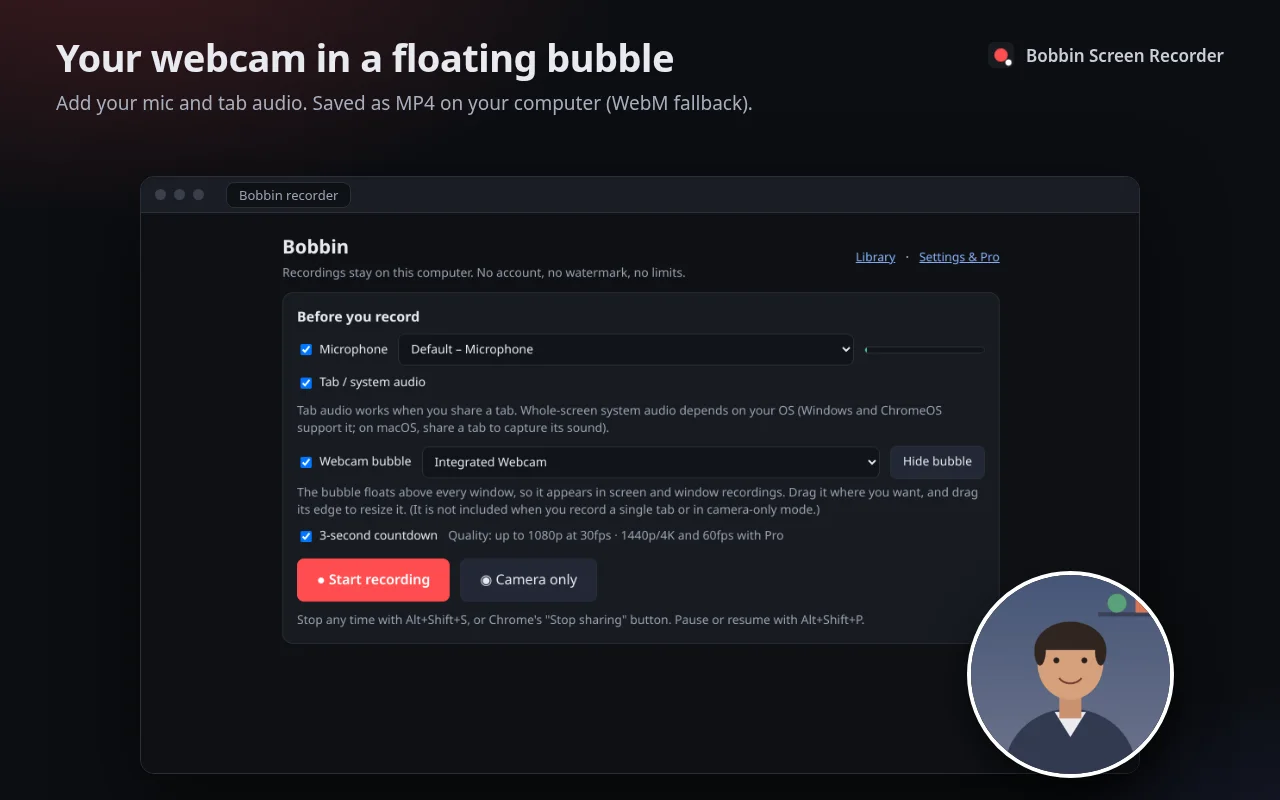
- Pick your microphone and camera. A round webcam bubble floats over your screen, and you can drag it anywhere.
- Chrome asks what to share: the entire screen, a window or a tab. After a 3-second countdown you're recording.
- Stop with Alt+Shift+S or Chrome's "Stop sharing" button. The video is already saved on your computer. Download the MP4 and send it however you like.
Loom Starter vs Bobbin Free
| Bobbin Free | Loom Starter (free) | |
|---|---|---|
| Account | Not needed | Required |
| Recording length | No time limit (your disk space is the limit) | 5 minutes per recording |
| Number of videos | No limit | 25 per person, archived ones included |
| Max quality | 1080p at 30fps | Up to 720p |
| Watermark or branding | None | Loom branding (removing it is a Business feature) |
| Where the video goes | Saved on your computer. Nothing is uploaded. | Loom's cloud |
| Get the video file | Yes: MP4 where your browser supports it, WebM otherwise | No download on Starter |
| Share link, comments, reactions | No. You send the file yourself. | Yes |
| Transcripts and captions | No | Yes |
| Webcam bubble | Yes, in screen and window recordings | Yes |
| System audio | Tab audio everywhere; whole-screen system audio on Windows and ChromeOS | Yes |
| Editing (trim, stitch) | No | On paid plans |
| Runs on | Chrome, Edge, Brave on Windows, Mac, Linux, ChromeOS | Chrome extension, desktop and mobile apps |
| Paid plan | $4.99/month or $24 once (optional) | $18 per user/month (Business) |
Competitor facts checked on 22 October 2026 from their own pages: loom.com/pricing · Loom help: How long can I record? · Loom help: Download your Loom video · Loom help: Starter plan FAQ. Plans change often; check the linked page before you decide.
When Loom is the better choice
We'd rather you pick the right tool than install the wrong one. Loom wins if:
- You need a link the second you stop recording. Loom hands you a share link as soon as you stop. With Bobbin you download the file and share it yourself (Slack, Teams, email, Google Drive, Jira).
- Your viewers comment and react on the video. Bobbin has no viewer page at all.
- You want transcripts, captions, AI titles or summaries. Bobbin has none of these.
- You want to see who watched. Bobbin has no analytics, by design.
- You record on your phone. Loom has iOS and Android apps. Bobbin is a Chrome extension and doesn't run on iPhone, iPad or Android.
- Your whole team shares a video library. Bobbin is a personal tool with no team workspace.
When Bobbin is the better choice
- Long recordings: lessons, walkthroughs and demos that run past 5 minutes. In our own test an 11-minute recording saved and played back cleanly; there is no cap.
- You need the file: to upload to YouTube, a course platform or an LMS, attach to a ticket, or archive. Bobbin gives you the MP4 straight away.
- Privacy: client work, internal tools, or anything you'd rather not upload to a third party. The extension has no account, no servers for video, no analytics and no trackers. It asks only for Chrome's storage, unlimitedStorage and alarms permissions.
- Budget: Free covers almost everything. If you want 4K/60fps or bubble styling, Pro is $24 once instead of a per-user subscription.
Other Loom alternatives worth a look
Bobbin isn't the only option. A quick, honest map:
- Screenity (free, open source): also records locally in Chrome with no account, and adds drawing, blur, a cursor spotlight and trimming. If you want annotation tools today, try it. Its cloud editor is the paid part (per screenity.io/extension).
- Vidyard Free: cloud-based like Loom, with a 30-minute limit but only 5 recorded videos a month, and no downloads on Free. See our Vidyard alternative page.
- Tella: polished recordings with a real editor, but there's no free plan (7-day trial). See Tella alternative.
- Built into your computer: macOS has a screen recorder (Shift-Command-5), Windows 11's Snipping Tool can record the screen, and Chromebooks have Screen capture. They're free and fine for a quick clip; none of them gives you a movable webcam bubble the way a Loom-style tool does (ChromeOS can add your front camera).
"How do I share without a link?"
This is the main habit change. Three ways people do it:
- Short clips: drag the MP4 straight into Slack, Teams, WhatsApp or an email. Mostly static screen recordings are small (about 4 MB per minute in our test); busy, full-motion video can be much larger.
- Longer videos: put the file in Google Drive, OneDrive or Dropbox and share that link. You choose who can see it.
- Tickets and docs: attach the file to Jira, Linear, GitHub, Notion or Confluence like any attachment (check your tool's size limit).