 Bobbin
The short version
- Choose Bobbin if you need more than 5 recordings a month, longer than 30 minutes, or the actual video file, and you don't need analytics.
- Stay with Vidyard if you sell with video: view tracking, CRM integrations, CTAs and branded sharing pages are its whole point.
What Vidyard Free allows
From Vidyard's pricing page and help centre (checked 22 October 2026):
- 5 recorded videos per month. Videos count toward the limit even if you delete them afterwards. The allowance refreshes on the day of the month you signed up.
- 30 minutes per recording. Vidyard warns you near the limit and keeps what you recorded.
- No downloads on Free. Vidyard's help centre says download is only available on paid plans, starting with Starter.
- Sign-up required (no credit card).
- Starter is $59 per seat per month, billed annually on the pricing page we checked; Teams and Enterprise are custom-priced.
Vidyard Free vs Bobbin Free
| Bobbin Free | Vidyard Free | |
|---|---|---|
| Account | Not needed | Required |
| Recordings per month | No limit | 5 per month |
| Recording length | No time limit | Up to 30 minutes |
| Get the video file | Yes, saved on your computer (MP4 where supported, WebM otherwise) | No download on Free |
| Where the video lives | Your computer only | Vidyard's cloud, shared by link |
| View tracking and analytics | None | Basic analytics |
| CRM and sales integrations | None | Limited on Free; more on paid plans |
| AI avatars and AI videos | None | Yes (limited on Free) |
| Paid plan | $4.99/month or $24 once | $59 per seat/month, billed annually (Starter) |
Competitor facts checked on 22 October 2026 from their own pages: vidyard.com/pricing · Vidyard help: Video usage and length limits in Vidyard Free · Vidyard help: How to download a video. Plans change often; check the linked page before you decide.
When Vidyard is the better choice
- You're in sales and want to know when a prospect watches your video.
- You need videos logged in HubSpot, Salesforce or Salesloft.
- You want a branded page with a call-to-action under the video.
- You want AI-generated personalised videos.
Bobbin does none of that. It's a recorder, not a sales platform.
When Bobbin is the better choice
- Volume: walkthroughs for your team, bug reports, feedback on designs, lessons. Five a month runs out fast.
- Files: you want to upload to YouTube or an LMS, attach to a ticket, or archive, without paying for downloads.
- Privacy: the recording never leaves your computer. No account, no analytics, no trackers.
- Long sessions: no 30-minute cut-off.
Switching in five minutes
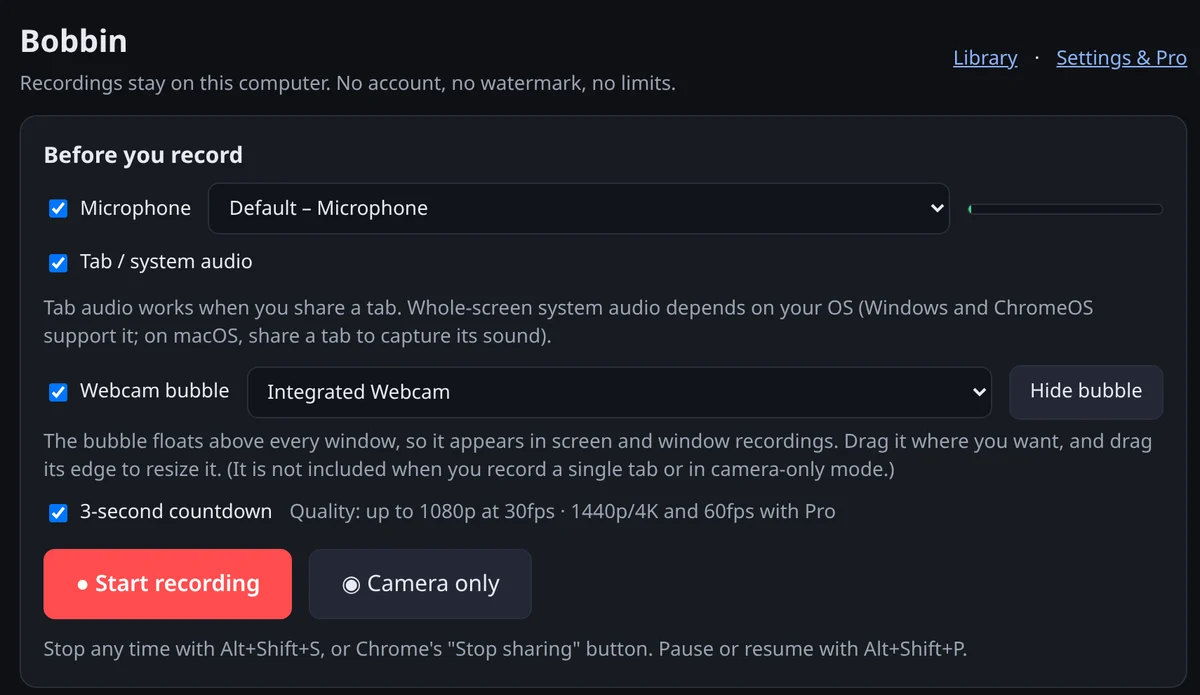
- Add Bobbin to Chrome (or Edge or Brave) and pin it from the puzzle-piece menu.
- Click the icon, then Record screen, window or tab. Allow the mic and camera the first time.
- Choose what to share in Chrome's picker. For a whole-screen demo with your face, pick Entire screen so the webcam bubble is included.
- Stop, then press Download. Send the MP4 by email, attach it to the CRM record, or share it from Google Drive.
If you send sales videos and still want tracking, a common split is: Vidyard for the few prospect videos where tracking matters, Bobbin for everything internal.